



What Do We Offer?
Telephony and Call Management.
Analytics. Quality Control. Call-to-Order. CRM Integration.
Our platform streamlines telephony operations for any enterprise. Establish your own Call Center, monitor and evaluate Call Center performance, handle missed calls, enhance customer loyalty, personalize interactions, and improve service quality. Perform comparative analyses across various criteria, analyze the call-to-order ratio, monitor incoming calls from new clients, and conduct marketing research.




IP Telephony
Allows you to organize and optimize telephony operations in any enterprise. Set up your own Call Center, manage call handling rules, ensure operator performance control and evaluation, handle missed calls, increase customer loyalty, improve customer service quality, organize customer service queues, adjust PBX operations based on the time of day, add a callback widget to your website, and many other features essential for high-quality and efficient call handling from your customers.

Call Management
Connect multi-line channels. Fully manage phone calls, both incoming and outgoing. Create internal numbers for employees, transfer and intercept calls, and set up a Call Center.

Missed Call Notifications
Never miss a call and retain your clients. Employees will always be informed of any missed calls and whether they have been addressed. Detailed reports on missed call management are also available for supervisors.

Interactive Voice Menu (IVR)
Set up a greeting message for your clients when they call. Automate incoming call handling by allowing clients to choose the department they need or request a callback.

Incoming Call Queues
If all operators are busy, the client will be placed in a queue and connected to the first available operator.

Callback Order
If the wait time for an operator is too long, clients can request a callback through the voice menu. Operators will be notified of the callback request and the call will be processed, ensuring the client is not lost.

Incoming Call Routing Rules
Route incoming calls to employees based on time of day, the phone line the client is calling, or operator availability. Additionally, rules for outgoing calls can be configured.

Time-Based Rules
Manage calls received outside business hours, inform clients of your working hours, and provide options to request a callback or leave a voicemail for follow-up during business hours.

Website Integration
Place a convenient callback widget on your website so clients can request a callback at a time and date that suits them.

Mobile Number Integration
Connect mobile numbers to your IP-PBX to handle incoming client calls. Manage multiple simultaneous calls to a single mobile number.

SMS Functionality
Centralize SMS messages sent to your mobile numbers in one place. Send SMS messages to clients through a convenient interface.
Reports, Analytics, Operators
Reports, Comparative Analytics, Operator Dashboard, Operator Performance Control
TELESTAT includes a set of standard and analytical reports for supervisors and managers, simplifying the process of monitoring, controlling, and analyzing the handling of incoming phone calls to the company or Call Center.
With these reports, you can significantly improve customer service quality and personalize client interactions, increase customer satisfaction, monitor operator workload and performance, manage operator working hours, effectively handle missed calls, and analyze the effectiveness of various marketing programs.
Conduct a comparative analysis of the call-to-order ratio: analyze each incoming call to determine if an order was placed, the order amount, the number of orders from new and existing clients, the most ordered items, and which operators handle the most orders.
Interested in our platform?
Request a presentation.
By filling out this form, you agree to the processing
of personal data.

Reports
Call history, new client calls, missed call management

Analytics
Analytical reports, period comparison results

New Clients
Reports and analytics on calls from new clients and unique numbers

Operator Dashboard
User-friendly interface for managing missed calls

Authorization and Permissions
Secure interface for managing user access and permissions

Productivity Control
Analytical reports, period comparison results
Interested in our platform?
Request a presentation.
By filling out this form, you agree to the processing
of personal data.
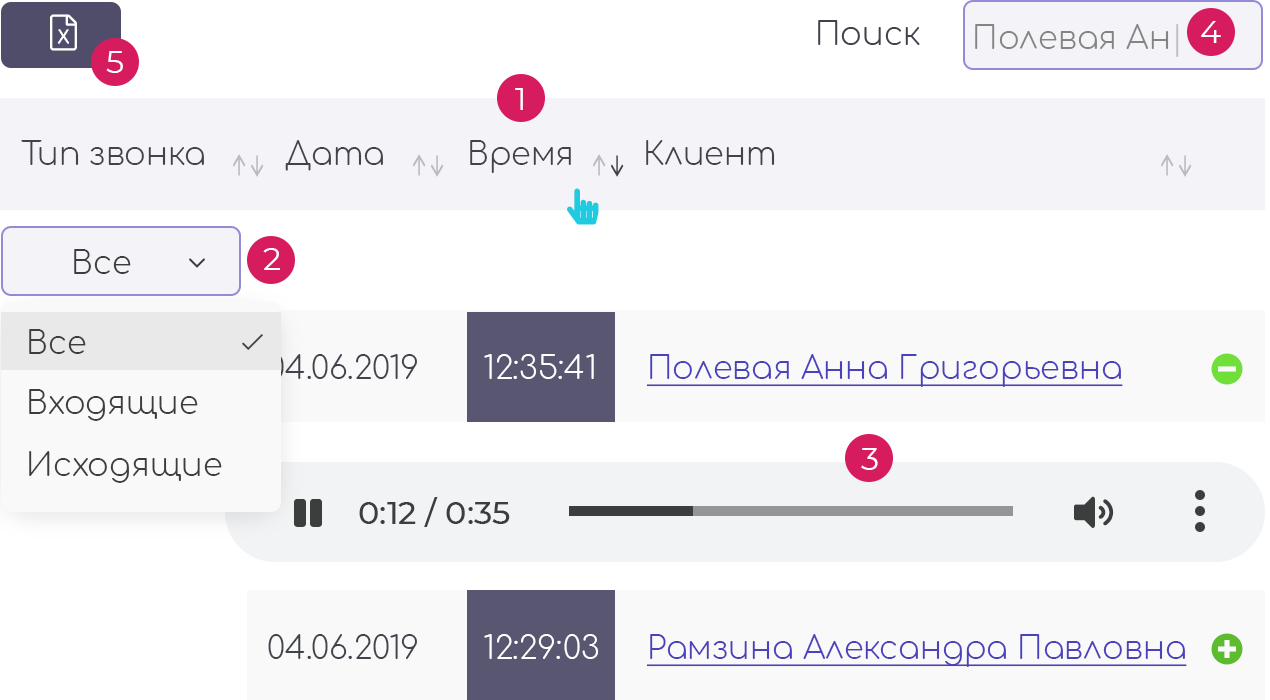
Call History
Detailed call history allows you to find any call at any time, check its status (answered or missed), listen to the recording, and download it.
- Data sorting;
- Dynamic filters;
- Listening and downloading call recordings;
- Dynamic search within the report;
- Export to Excel;
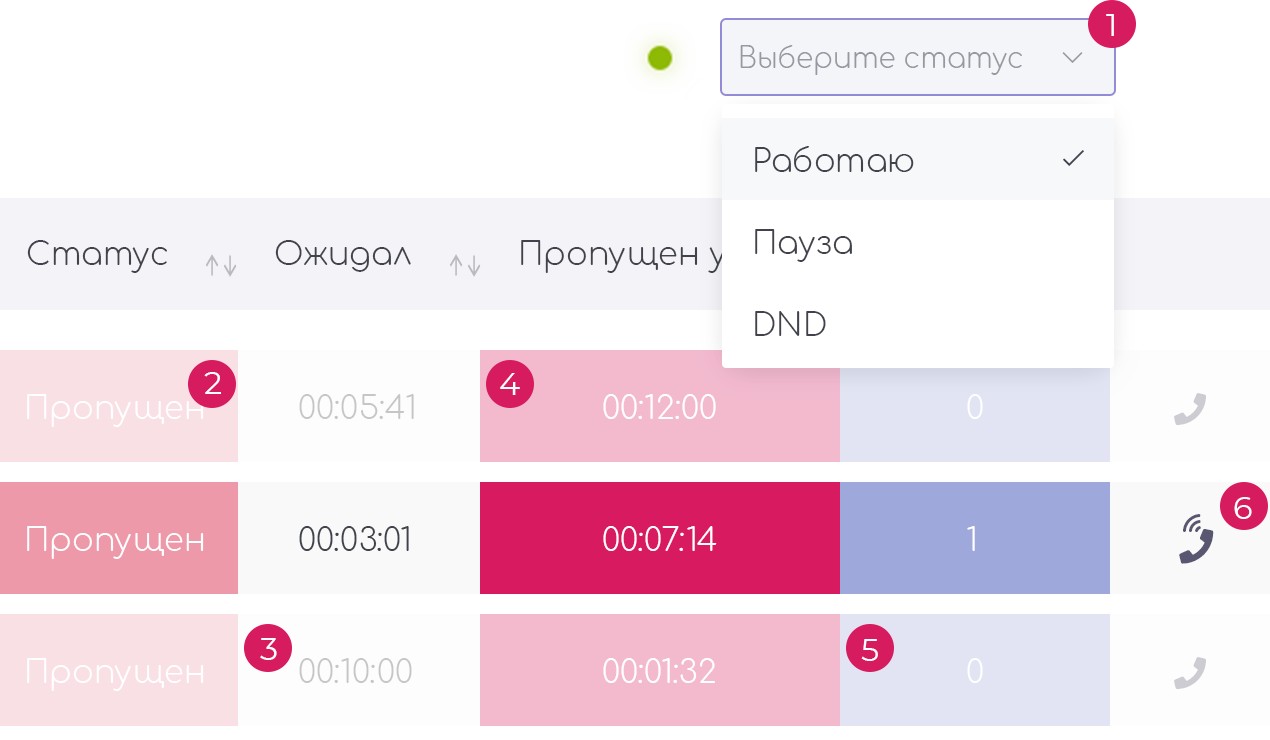
Operator Dashboard
Organize your Call Center for call handling. User-friendly interface, missed call and Callback request management, call status tracking, dynamic information updates, browser-based calling, and operator work time control. Manage operator statuses efficiently.
- Manage operator statuses and monitor working hours;
- Control missed calls and Callback requests;
- Notifications for long-unprocessed calls;
- Track call-back attempts to clients;
- Browser-based calling;
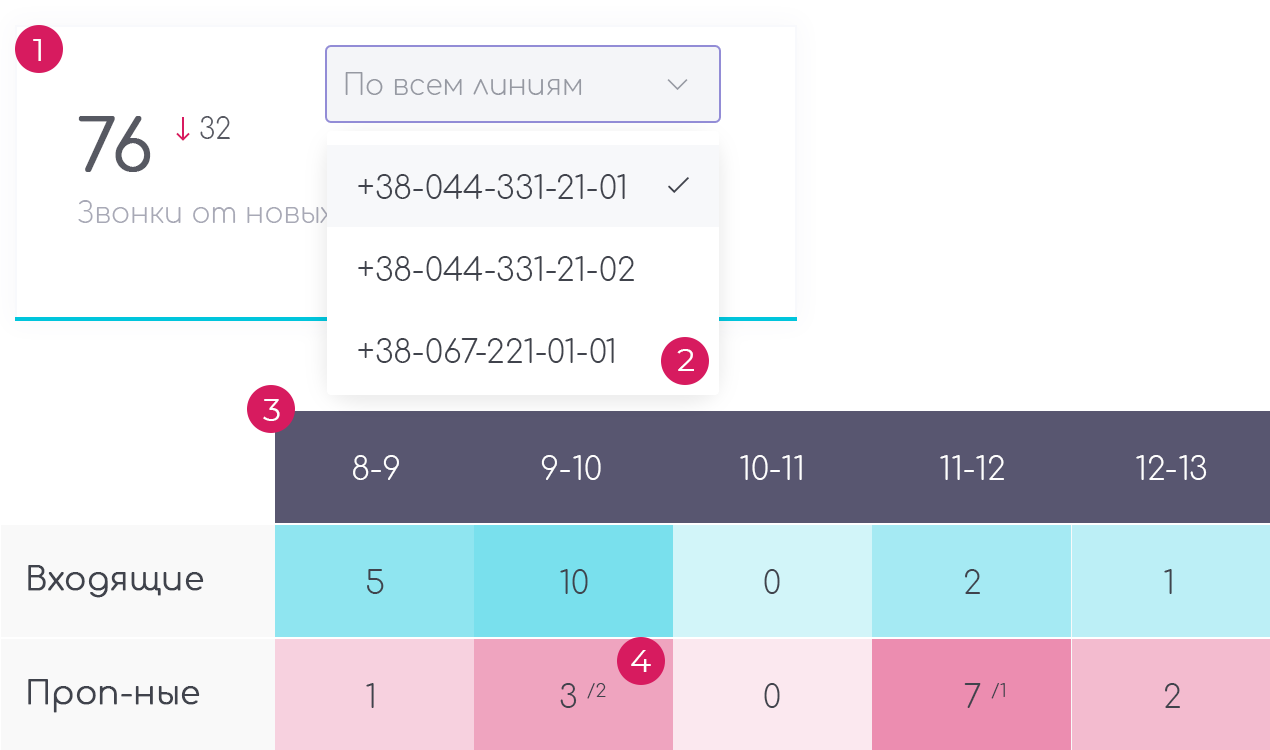
New Clients
Tracking and analyzing the receipt and quality of handling calls from new clients. Information for the current day and over a period. Graphs showing the call influx from new clients throughout the day, hourly. Listen to recordings of conversations with these clients.
- Information for the day, compared to the previous period;
- Dynamic filters with line selection options;
- "Heat map" for call distribution throughout the day;
- Missed call tracking for new clients;
- Graphs;
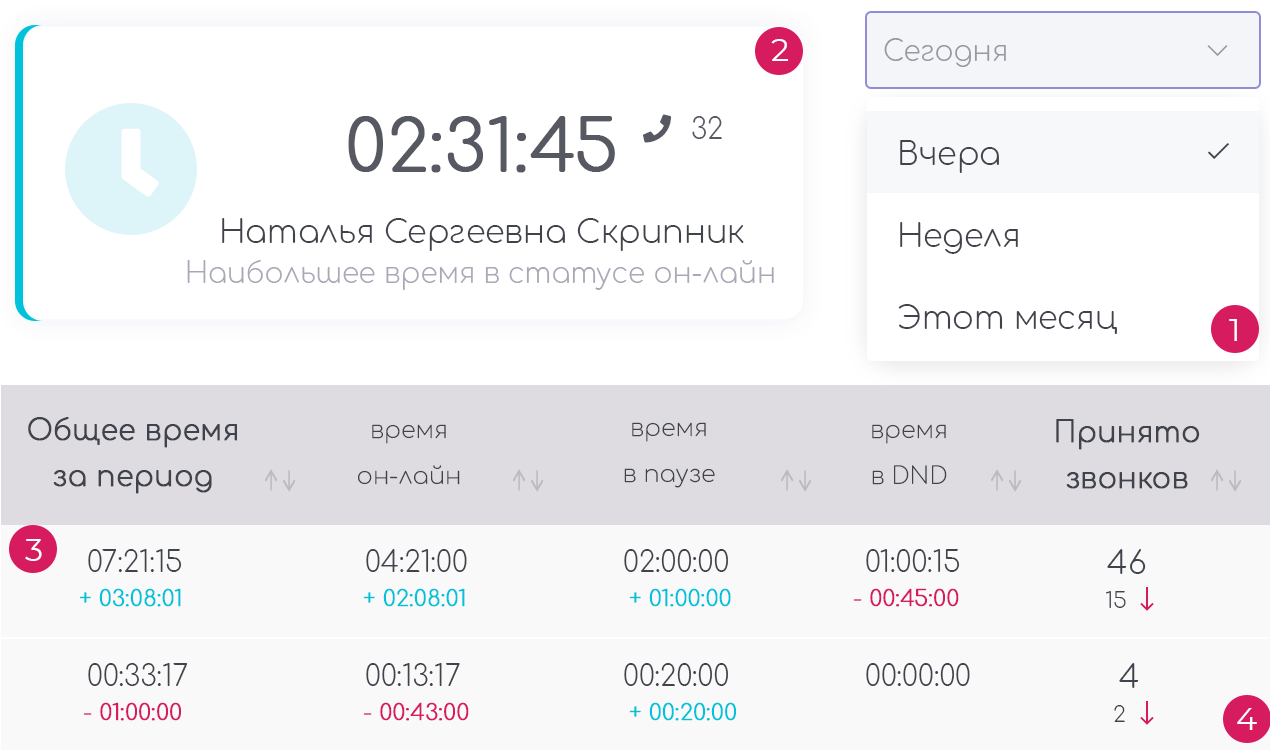
Productivity Control
Analyze operator working hours and their efficiency – how much time an operator worked, the number of calls received, the number of orders from those calls, the number of calls made, and call duration analysis. Operator ratings.
- Reports for periods and comparative analysis;
- Operator ratings across various parameters;
- Productivity analysis compared to other periods;
CTO: Call-to-Order
Analysis of Call-to-Order Ratio
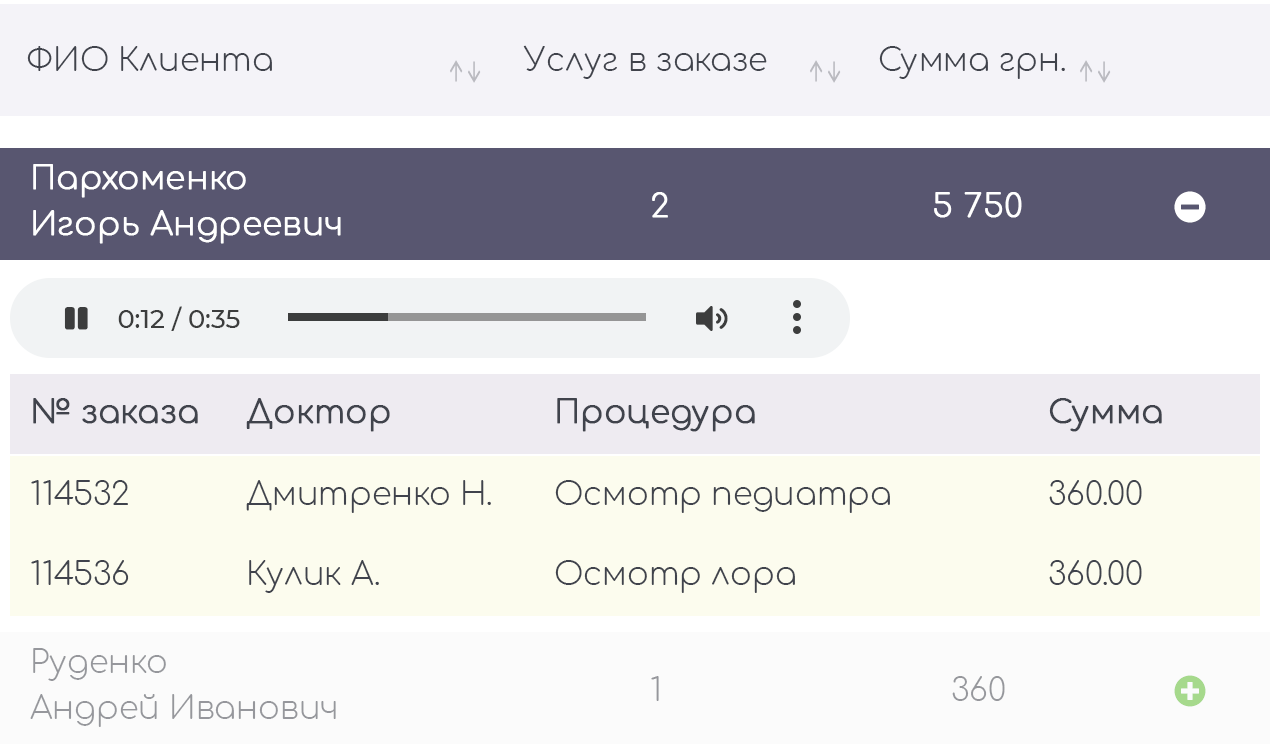
Call-to-Order Analytics
The Telestat platform allows integration with the client's existing CRM system or other database for comparative analysis of incoming calls and the associated orders for products or services. Analyze the performance of operators or sales managers, the popularity of specific services, products, or even individual professionals. Obtain information on order amounts per call and more.
- Analyze calls and related orders;
- Display orders from existing and new clients;
- Comparative reports over a period;
- Operator ratings;
- Customizable reports and ratings;
Proper functionality requires integration with a CRM system.
Integration
Get More by Integrating the Telestat Platform with Your CRM
Teletat can be integrated with almost any CRM system, database, or website. By integrating, you will achieve maximum efficiency from using the platform.

Tooth Fairy
The platform is integrated with the "Tooth Fairy" software suite

MedAccount
The platform is integrated with the "MedAccount" software suite

Website
The platform can be integrated with websites

Other CRMs
The platform can be integrated with other CRMs and databases
- Receive callback requests through the website;
- Display client name in statistics and analytics;
- Incoming call information with client name, client card, or other information;
- Call-to-order analytics;
- Route incoming client calls to the assigned manager;
- Work with SMS messages;
These are just a few of the benefits you get when integrating Telestat with your CRM system, database, or website.
Custom modules with the functionality you need and analytical reports can be developed for you upon request.
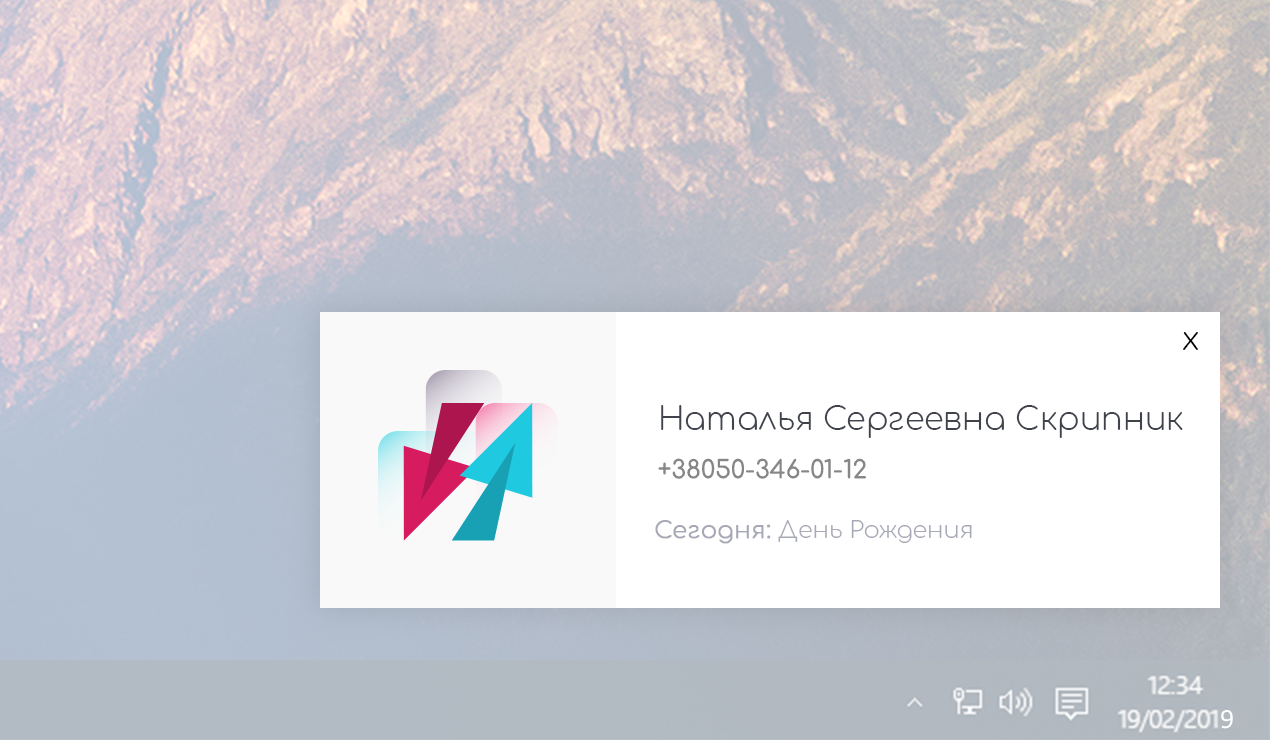
Incoming Call Information
Personalize your communication with clients. When an incoming call is received, the client's name and other information are displayed. This can include birthday reminders, discounts, and other notes.
- Display the number from which the call is received;
- Display the client's name;
- Display additional statuses;
- Cross-platform compatibility;
Website Integration
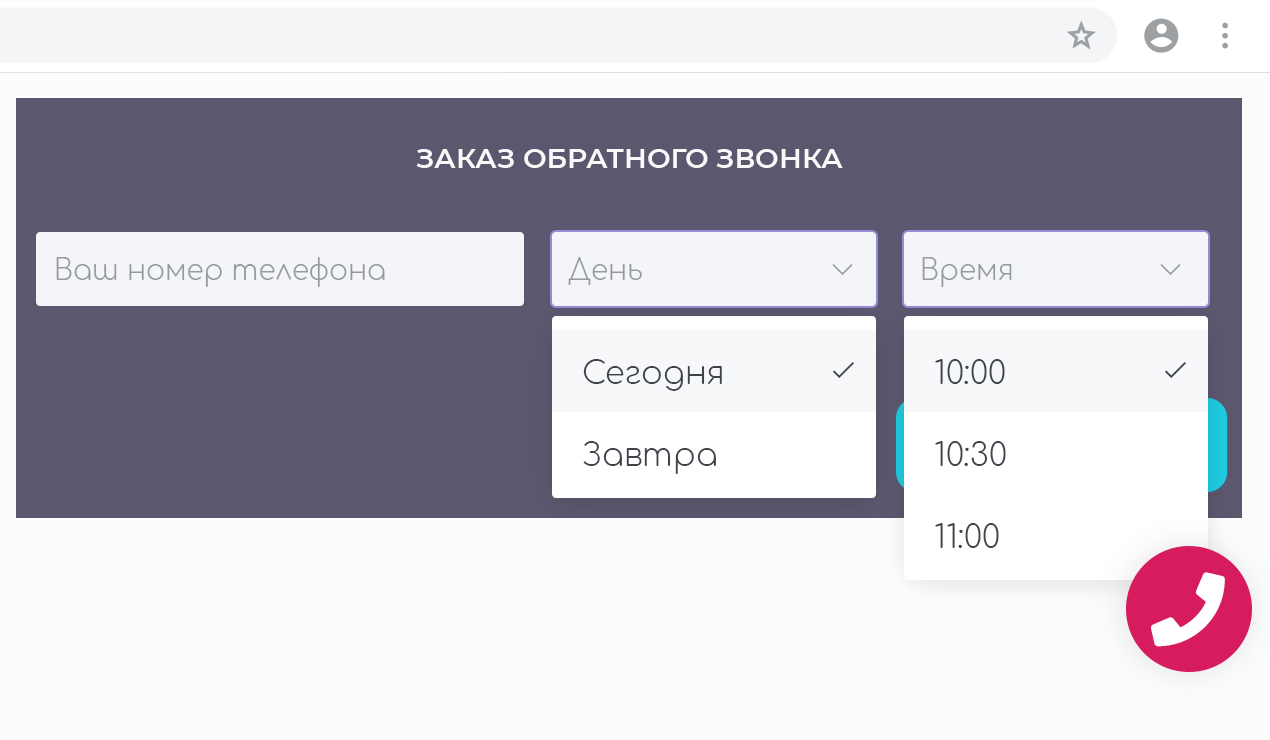
Place a convenient callback widget on your website so clients can request a callback at a time and date that suits them.
- Callback request button;
- Choice of time and date;
- Operator notifications;
Pricing
Pricing for IP-PBX "Telestat"
| Cloud Solution: Minimum Cost — Maximum Functionality | Your Server – Your Rules: Standalone Solution on Your Server | Maximum Capabilities for Large Teams and Call Centers, For Excellent Service | |
|---|---|---|---|
| TELESTAT Cloud-PBX |
TELESTAT Basic |
TELESTAT Call Center |
|
|
$35 .00
/per month
|
$535 .00
|
$759 .00
|
|
| Placement | |||
| Placement | cloud infrastructure | client server | client server |
| PBX Installation | |||
| PBX Installation | ✔ | ✔ | ✔ |
| Migration from Another Telephony (transfer of basic PBX settings: internal numbers; city lines; single-level IVR; basic routing; user training;) |
|||
| Migration from Another Telephony (transfer of basic PBX settings: internal numbers; city lines; single-level IVR; basic routing; user training;) |
3,400 UAH | free | free |
| Customer Phone Number Connection | |||
| Customer Phone Number Connection | up to 5 numbers (each additional number — 440 UAH / one-time fee) |
up to 10 numbers (each additional number — 440 UAH / one-time fee) |
up to 20 numbers (each additional number — 440 UAH / one-time fee) |
| Number of Workstations | |||
| Number of Workstations | 8 | 15 | 25 |
| Additional Workstation (per user) |
|||
| Additional Workstation (per user) |
125 UAH/month | unlimited | unlimited |
| IP Phone Configuration (at launch) | |||
| IP Phone Configuration (at launch) | up to 10 units (each additional unit — 240 UAH / one-time fee) |
up to 15 units (each additional unit — 240 UAH / one-time fee) |
up to 25 units (each additional unit — 240 UAH / one-time fee) |
| GSM Gateway Configuration | |||
| GSM Gateway Configuration | customized | customized | customized |
| Employee Personal Account | |||
| Employee Personal Account | ✔ | ✔ | ✔ |
| Data and Report Access Rights Management | |||
| Data and Report Access Rights Management | ✔ | ✔ | ✔ |
| Call Recording | |||
| Call Recording | 2,000 minutes | depends on hard drive capacity | depends on hard drive capacity |
| Additional 10,000 Minutes of Call Recording | |||
| Additional 10,000 Minutes of Call Recording | 240 UAH/month | depends on hard drive capacity | depends on hard drive capacity |
| Time-Based Operational Rules | |||
| Time-Based Operational Rules | ✔ | ✔ | ✔ |
| Interactive Voice Response (IVR) | |||
| Interactive Voice Response (IVR) | single-level (custom setup for multi-level) |
single-level (custom setup for multi-level) |
multi-level |
| Automatic Call Distribution | |||
| Automatic Call Distribution | by schedule, queue, department, assigned manager (custom script configurations available: auto-attendant, IVR, callback ordering, or other script) |
||
| Auto-Notification Module for Incoming Calls (Automatic announcements, notifications, information, etc., during incoming calls) |
|||
| Auto-Notification Module for Incoming Calls (Automatic announcements, notifications, information, etc., during incoming calls) |
✔ | ✔ | ✔ |
| General Information on Phone Lines (Lines, directions, number of calls, wait times, etc.) |
|||
| General Information on Phone Lines (Lines, directions, number of calls, wait times, etc.) |
✔ | ✔ | ✔ |
| Operator Performance Evaluation Module | |||
| Operator Performance Evaluation Module | included | included | included |
| Detailed Call Reports (Reports with filtering by date, direction, call duration, and other parameters) |
|||
| Detailed Call Reports (Reports with filtering by date, direction, call duration, and other parameters) |
✔ | ✔ | ✔ |
| Integration with CRM Systems | |||
| Integration with CRM Systems | optional | optional | optional |
| API Access | |||
| API Access | ✔ | ✔ | ✔ |
| Technical Support | |||
| Technical Support | basic | extended | premium |
| User Actions History in IVR and Call Transfer History | |||
| User Actions History in IVR and Call Transfer History | ✔ | ✔ | ✔ |
| Operator Status Management (working, break, not working) |
|||
| Operator Status Management (working, break, not working) |
✔ | ✔ | ✔ |
| Call Comments and Tagging | |||
| Call Comments and Tagging | ✔ | ✔ | ✔ |
| Click-to-Call for Client | |||
| Click-to-Call for Client | ✔ | ✔ | ✔ |
| Client Call Back (Callback Functionality) | |||
| Client Call Back (Callback Functionality) | ✔ | ✔ | ✔ |
| SMS Notifications for Clients | |||
| SMS Notifications for Clients | optional | optional | optional |
| Email Notifications for Clients | |||
| Email Notifications for Clients | optional | optional | optional |
| Voice Message to Client's Phone | |||
| Voice Message to Client's Phone | optional | optional | optional |
| Call Analytics and Reports | |||
| Call Analytics and Reports | ✔ | ✔ | ✔ |
| Automatic Call Completion Status Detection | |||
| Automatic Call Completion Status Detection | ✔ | ✔ | ✔ |
| Missed Call Analysis | |||
| Missed Call Analysis | ✔ | ✔ | ✔ |
| Employee Productivity Reports | |||
| Employee Productivity Reports | ✔ | ✔ | ✔ |
| Detailed Billing Reports | |||
| Detailed Billing Reports | available | available | available |
| Regular System Updates | |||
| Regular System Updates | ✔ | ✔ | ✔ |
| Automatic Software Update Notifications | |||
| Automatic Software Update Notifications | ✔ | ✔ | ✔ |
| Data Backup Options | |||
| Data Backup Options | available | available | available |
| Disaster Recovery Plan | |||
| Disaster Recovery Plan | optional | optional | optional |
| 24/7 Customer Support | |||
| 24/7 Customer Support | optional | optional | included |
| Dedicated Account Manager | |||
| Dedicated Account Manager | optional | optional | included |
| Custom Feature Development | |||
| Custom Feature Development | available | available | available |
| System Security Audit | |||
| System Security Audit | optional | optional | included |
| Compliance with Data Protection Laws | |||
| Compliance with Data Protection Laws | ✔ | ✔ | ✔ |
| Data Backup | |||
| Data Backup | 4 copies | provided by client | provided by client |
* The cost of GSM gateways, servers, and other expenses related to connecting phone numbers and launching the platform is additionally borne by the client.
** The cost of recording a voice greeting or IVR is additionally paid by the client.
*** Additional or specific PBX configuration, report or module development, CRM or website integration are paid separately. Final cost is determined after agreeing on the Technical Specification.
Technical Support
| Simple solution for smooth operation — basic support when needed | Optimal solution for business — more features and extended support | Maximum support for large teams with individual approach and fast response | |
|---|---|---|---|
| TELESTAT SUPPORT Base |
TELESTAT SUPPORT Standard |
TELESTAT SUPPORT Business |
|
from 0 UAH per month |
from 4,500 UAH per month |
from 7,500 UAH per month |
|
| Cost | |||
| Cost | from 0 UAH per month | from 4,500 UAH per month | from 7,500 UAH per month |
| Number of Support Hours in Package (per month) | |||
| Number of Support Hours in Package (per month) | up to 1 hour | up to 3 hours (support/development) | up to 5 hours (support/development) |
| Priority Technical Support | |||
| Priority Technical Support | ✖ | ✔ | ✔ |
| First Line Support | |||
| First Line Support | ✖ | ✖ | ✔ |
| Response Time | |||
| Response Time | up to 4 hours | up to 2 hours | up to 30 minutes |
| Issue Resolution Time | |||
| Issue Resolution Time | up to 6 hours for 75% of requests | up to 4 hours for 65% of requests | up to 3 hours for 60% of requests |
| Technical Support Availability | |||
| Technical Support Availability | 09:00 - 18:00, Mon-Fri (except holidays and weekends) | 08:30 - 18:30, Mon-Fri (except holidays and weekends) | 08:30 - 19:00, Mon-Sun |
| Email Technical Support | |||
| Email Technical Support | ✔ | ✔ | ✔ |
| Phone Technical Support | |||
| Phone Technical Support | ✖ | ✔ | ✔ |
| Dedicated Support Chat | |||
| Dedicated Support Chat | ✖ | ✖ | ✔ |
| Assigned Specialist | |||
| Assigned Specialist | ✖ | ✖ | ✔ |
* Prices are shown in conditional units. 1 conditional unit = 1 US dollar at the current NBU rate. Calculations are made in non-cash form to the executor’s account in the national currency of Ukraine.